
Mistakes happen on whelping night. Breeders Aid lets you fix them without losing anything: each correction that matters is noted in the litter's diary, so the whole team can see what changed and when. Removed puppies and litters are kept on record with a reason, but no longer counted or listed.
Steps
Correct a puppy's details
- Open the litter and tap the puppy (on the Puppies tab, or under Puppies born in Whelping mode).
-
Tap the pencil (Edit) at the top right.
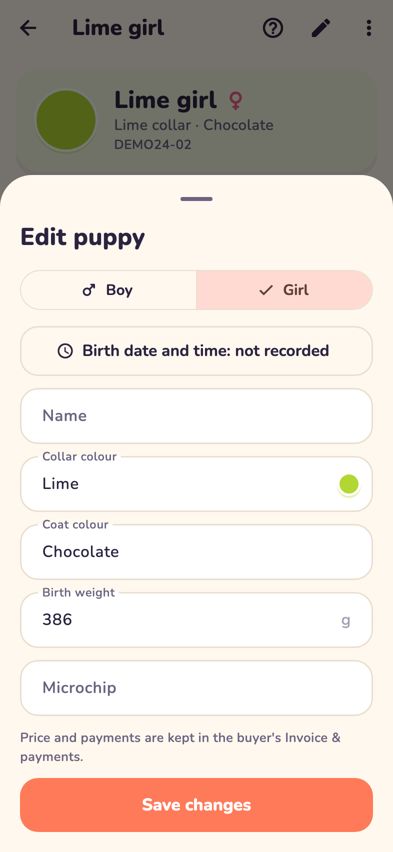
The Edit puppy sheet with Boy, Girl, birth time and other details -
Change what's wrong:
- Boy or Girl.
- The birth date and time: tap Born …, choose the date, then the time.
- Name, Collar colour, Coat colour, Birth weight or Microchip.
- Tap Save changes. Changes to sex, birth date and time, birth weight and collar are noted in the diary, for example "Corrected Red boy: birth weight 420 g → 402 g".

Remove a puppy entered by mistake
- Open the puppy and tap ••• at the top right, then Remove puppy….
-
Choose a reason (Entered twice, Entered by mistake or Wrong litter) or type your own in Reason.
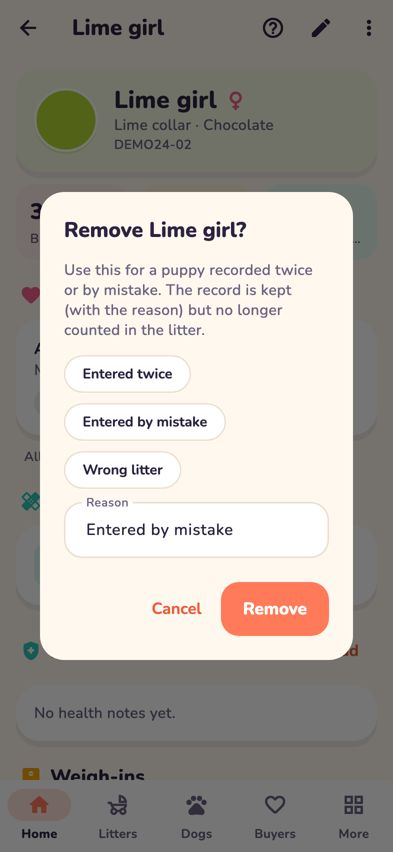
Removing a puppy with a reason - Tap Remove. The puppy is no longer counted in the litter, and the removal is noted in the diary.

Fix the litter's details
-
Open the litter and tap ••• at the top right.
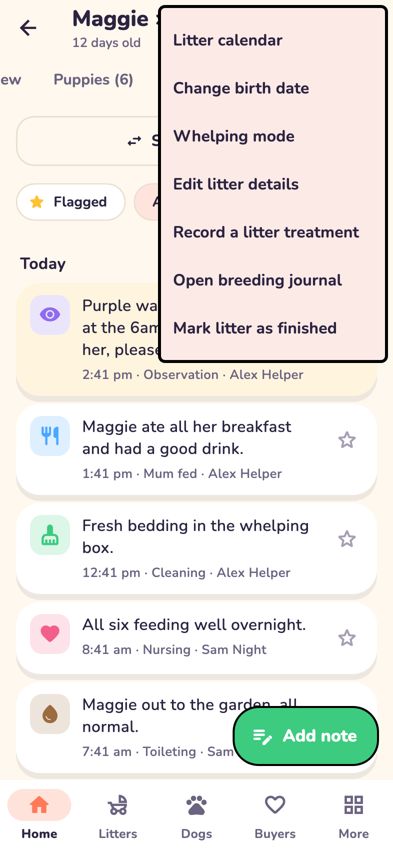
The litter menu with Change birth date, Whelping mode and Edit litter details - Choose Edit litter details to change the Litter name, mum, dad (Change or Clear) or the Registration litter number, then tap Save changes.
- Choose Change birth date if the puppies were born on a different day. Pick the date, then tap Update schedule. Puppy care dates move to match. Dates you changed by hand and anything already done stay as they are, and breeding dates don't change.

Remove a litter created by mistake
- Open the litter (it must have no puppies) and tap •••, then Remove litter….
- Check the Reason and tap Remove litter.
Tips
- To see every correction, open the litter's Diary tab. Corrections are listed with the time and who made them.
- Wrong weigh-in weight? Open the weigh-in for that day again and type the right number. See Record and correct puppy weights.
Troubleshooting
- I can't see Remove litter… in the menu. It only appears when the litter has no puppies. Remove any puppies entered by mistake first.
- I removed the wrong puppy. The record is kept, but it can't be restored in the app yet. Contact us through Help & support in More.
- I changed the registration litter number but the puppies kept their codes. That's on purpose. Puppies already numbered keep their existing codes; only new puppies get codes from the new number.
- The birth time I picked moved to the wrong day. In Edit, choose the date first and then the time, so the puppy's exact birth date and time are both set.
- Can I undo a change? Edit the puppy again and put the old value back. The diary keeps a note of both changes.