
Regular weigh-ins are the easiest way to see that every puppy is thriving. The Weigh-in screen lists the whole litter so you can type each weight in turn, and shows the change since last time as you go. A puppy's birth weight counts as its first weight, so the very first weigh-in already shows a gain or loss.
Steps
- Start a weigh-in. On Home, tap Weigh puppies (or Weigh on a litter card). Or open the litter and tap Weigh puppies.
- Check the day at the top left. It's Today unless you tap it and choose another date.
-
Type each puppy's weight in grams in the box on the right. Tap Next on the keyboard to move to the next puppy. Under each name you'll see the last weight (or the birth weight) and the change.
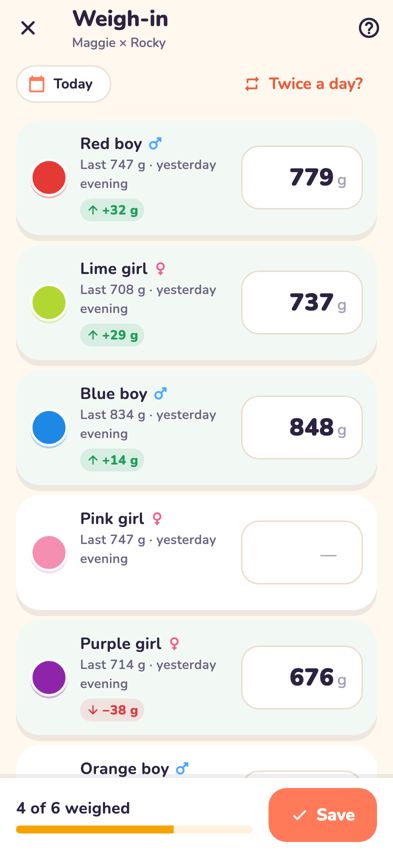
The Weigh-in screen with each puppy's last weight and a box for today's weight - Watch the bar at the bottom: it shows how many are weighed, for example 5 of 7 weighed.
- Tap Save. You don't have to weigh everyone. Puppies left blank are skipped.
- Bernie shows a summary: the Average gain, each puppy's change and anyone who's not weighed. Tap Done.

Weigh twice a day
- On the Weigh-in screen, tap Twice a day?. (Or turn on Weigh twice a day in More.)
- Choose Morning or Evening at the top of each weigh-in.
Correct a weight
- Open the weigh-in again for the same day (and the same Morning or Evening, if you weigh twice a day). The weights you saved are already filled in.
- Change the wrong weight and tap Save. The saved weight is updated, not added a second time.
Tips
- If a weight is a big change from last time, you'll see Big change — check it. When you save, Breeders Aid asks Double-check these? Tap Fix it to go back, or They're right to save.
- Leaving with unsaved weights? Breeders Aid asks Leave without saving? Tap Keep weighing to stay.
- You can type weights like 420, 420g or 0.42kg.
- See the trends over time on the litter's Weights tab. See Read the growth charts.
Troubleshooting
- The Save button is greyed out. Type at least one weight first.
- It says "Check the weight for…". That weight couldn't be read. Use numbers in grams, for example 420.
- I saved weights under the wrong day. Saved weights can be corrected but not deleted in the app yet (leaving a box blank just skips that puppy). Weigh in again on the right day, and contact us through Help & support in More to remove the wrong ones.
- A puppy shows a red flag after the weigh-in. Flags such as "Down 30 g since the last weigh-in — worth a closer look" are prompts for your judgement, not a diagnosis. If you're worried, call your vet.
- The first weigh-in shows a change already. That's the change from the puppy's birth weight.