
Whelping mode is made for the whelping box: big buttons, one hand, very little typing. Tap Puppy born! as each puppy arrives, and Breeders Aid keeps a live count of boys, girls, weights and placentas. Anything you skip can be added or corrected later.
Steps
-
Open Whelping mode. Choose Whelping mode straight after creating the litter, tap the Whelping mode card on the litter's Overview tab, or choose Whelping mode from the litter's ••• menu.
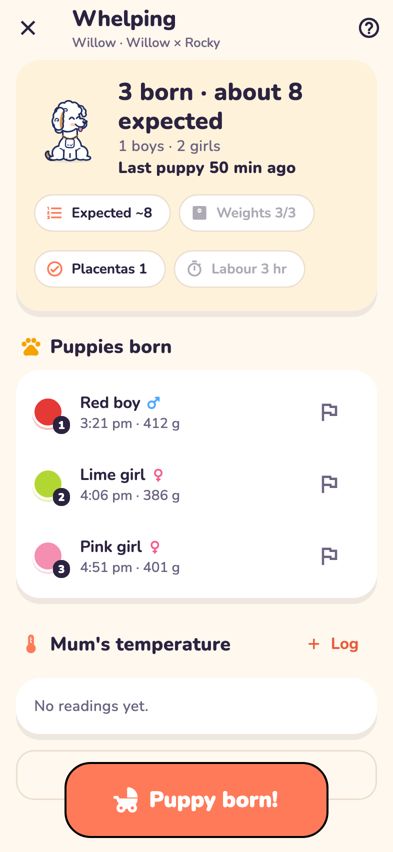
Whelping mode with the litter summary and the Puppy born! button - When a puppy arrives, tap the big Puppy born! button at the bottom.
- Tap Boy or Girl.
- Check the birth time. It's set to now. If the puppy arrived a little earlier, tap Born … and choose the time.
- Type the Birth weight (optional) in grams, for example 420. Skip it if you haven't weighed the puppy yet.
-
Tick Placenta delivered if the placenta has come with this puppy.
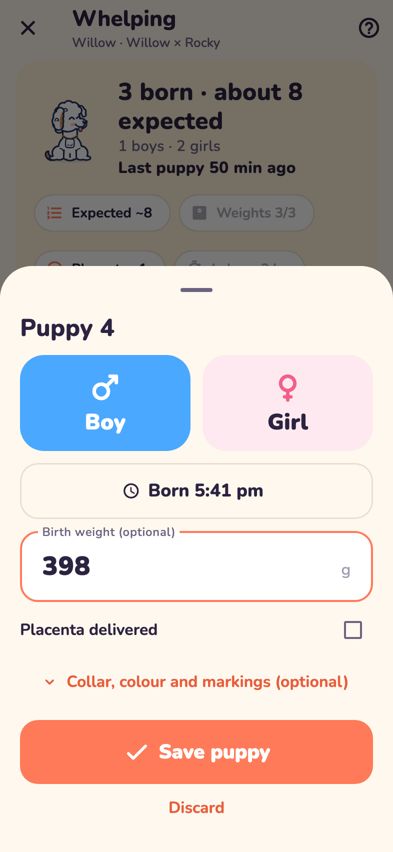
The birth sheet with Boy, Girl, birth time, weight and placenta -
If you like, tap Collar, colour and markings (optional) to choose a collar colour, type the Coat colour and add Markings or notes (for example "white blaze on chest").
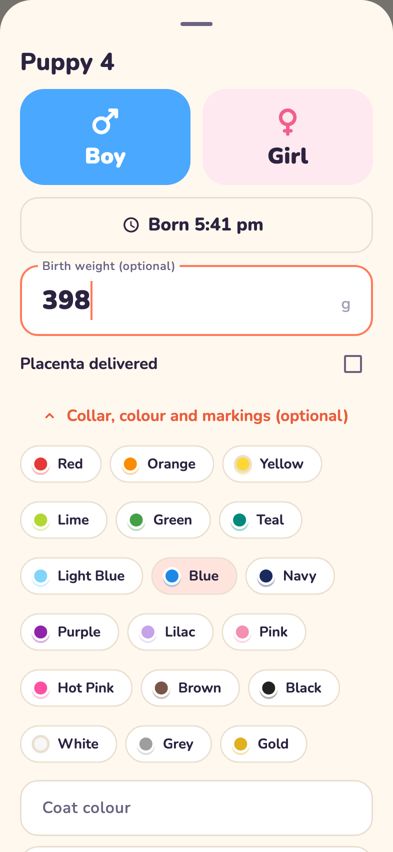
The birth sheet opened out to show collar colours, coat colour and markings - Tap Save puppy. Bernie welcomes the new arrival and the puppy appears under Puppies born, numbered in birth order.


The live summary
The card at the top of Whelping mode shows:
- How many are born, how many boys and girls, and how long since the last puppy.
- Set expected: tap to enter how many you're expecting (for example from the X-ray). It's an estimate and never limits how many you can record.
- Weights: how many birth weights are recorded so far.
- Placentas: tap to record a placenta that arrives on its own.
- Labour started: tap once to note when labour began.
Tips
- Births after midnight: if you choose a time later than now (for example 11:50 pm when it's already 12:10 am), Breeders Aid knows the puppy was born yesterday and shows Born Yesterday 11:50 pm.
- If the app closes or the phone locks: the puppy you were adding is kept on the phone. When you open Whelping mode again, the sheet reopens with Restored the puppy you were adding.
- Mum's temperature: tap Log next to Mum's temperature and type the reading, for example 37.5.
- A puppy needs watching: tap the flag next to the puppy (Needs extra attention). The puppy gets a star, a flagged note goes in the diary for the team, and a health note is added to the puppy's record.
- A note for the team: tap Add a note at the bottom of the screen.
- Two hours without a puppy: the time since the last puppy turns red and a reminder appears. If mum is straining or you're worried, call your vet.
Troubleshooting
- It says "Boy or girl?" when I tap Save puppy. Choose Boy or Girl first. Everything else is optional.
- It says "Not saved" and my details are still there. The connection dropped. Your entries are kept, so tap Save puppy again. Breeders Aid won't add the same puppy twice.
- It warns that a collar is already used. Another puppy in this litter has that collar. Tap Choose another, or Save anyway if you really mean it.
- I started a puppy by mistake. Tap Discard at the bottom of the sheet.
- I saved the wrong time, weight or sex. Tap the puppy in Puppies born and use Edit. See Fix a mistake in a litter or puppy.