Your dogs are the starting point for everything else: a litter needs a mum (and usually a dad), and each dog's profile shows her breedings, litters and health notes. You add dogs from the Dogs tab.
Steps
-
Tap Dogs at the bottom of the screen.
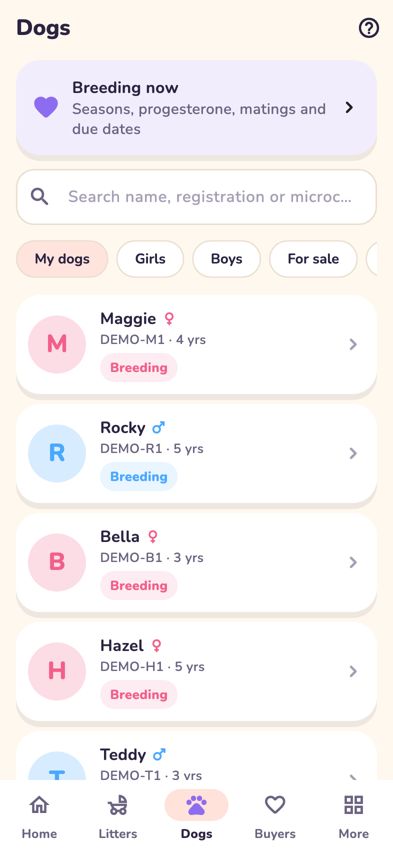
The Dogs tab with Breeding now, search and filter chips - Tap the + button at the top right (Add a dog).
-
On the Add Dog screen, fill in what you know:
- Dog name
- Girl or Boy: needed, so she can be chosen as a mum (or he as a dad).
- One of my dogs: leave it on for your own dogs, so the dog shows under My dogs.
- Registration number (ALA, optional)
- Microchip (optional)
- DOB: tap to choose the date of birth.
- Breeder and Owner: start typing a name and choose the person from the list.
- Spay Due Date, if it applies.
- Tap Save Dog.
- To find a dog later, type a name, registration or microchip number in the search box on the Dogs tab, or tap a filter: My dogs, Girls, Boys, For sale or Everyone.
-
Tap a dog to open her profile. You'll see her parents, health details, Breeding, Litters (with New litter) and Health notes.
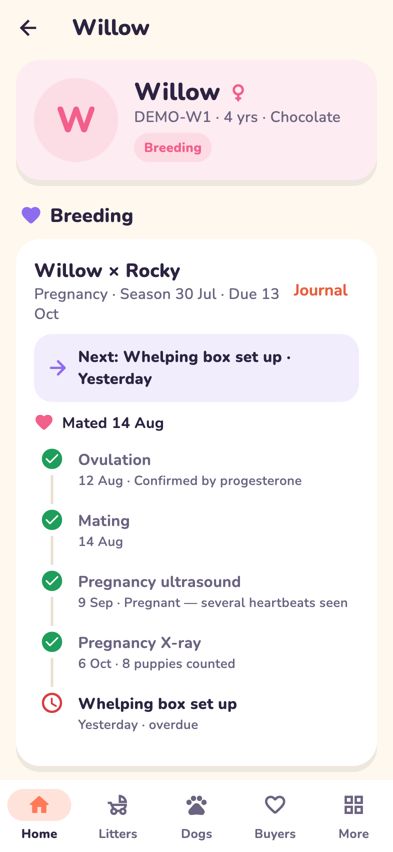
A dog's profile showing breeding, litters and health notes


Tips
- To add a health note to any dog, open her profile and tap Add next to Health notes. Choose a topic such as Vet visit or Worming, write a short note and tap Save note.
- You don't need to add puppies here. Puppies are added to their litter, either in Whelping mode or with Add puppy. See Record each birth in Whelping mode.
- For photos, files, DNA and editing a dog's details, tap Full record: photos, files, DNA & edit at the bottom of her profile.
Troubleshooting
- I can't see the + button on the Dogs tab. It isn't shown in practice (demo) mode. Leave demo mode and sign in to your own account to add real dogs.
- It says "Choose Girl or Boy." Tap Girl or Boy near the top, then Save Dog again.
- My new dog isn't in the list. The list starts on My dogs. If you switched off One of my dogs, tap Everyone, or search for her name.
- She doesn't appear when I choose a mum for a new litter. The Who is mum? list only shows girls. Open her profile, tap Full record: photos, files, DNA & edit, edit her details, choose Girl and save.
- "A dog with that registration number is already in Breeders Aid." She's already recorded. Search for her name or number under Everyone on the Dogs tab.
- Search shows "No dogs found". Check the spelling, or try part of the name or the registration number instead.