Each puppy has its own screen with everything in one place: collar and colour, birth and current weight, any flags, its buyer, desexing, health notes and every weigh-in. You can update its details as the puppy grows, for example once it has a name or a microchip.
Steps
-
Open the litter and tap the Puppies tab, then tap the puppy.
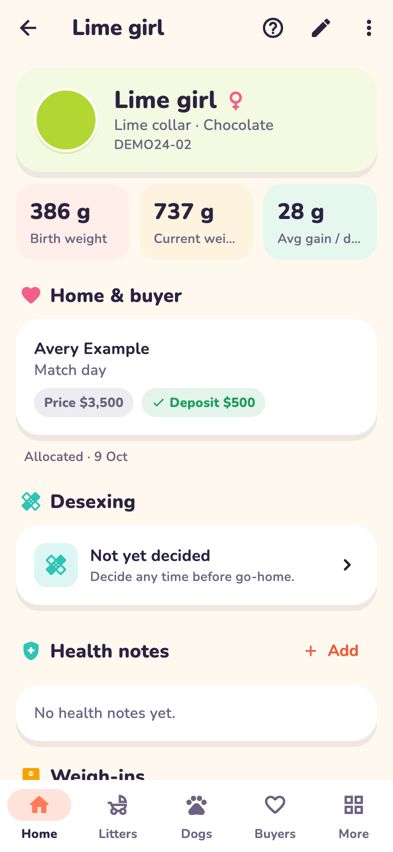
A puppy's screen with collar, weights, buyer and health notes - At the top you'll see the collar, sex, coat colour and registration code, then Birth weight, Current weight and Avg gain / day.
-
To change details, tap the pencil (Edit) at the top right. You can update:
- Boy or Girl and the birth date and time.
- Name: until you give one, the puppy is called by its collar, for example Red boy.
- Collar colour and Coat colour.
- Birth weight and Microchip.
- Markings or notes, for example "white blaze on chest".
- Agreed price and Paid in full (until the puppy has a buyer).
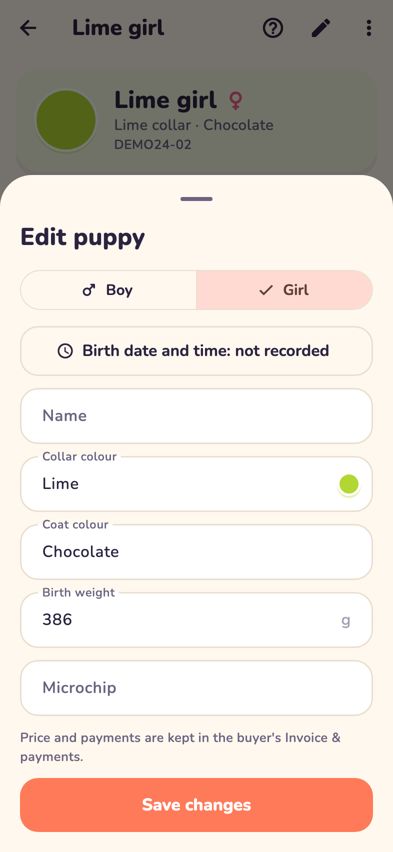
The Edit puppy sheet - Tap Save changes.
- To add a note about the puppy's health, tap Add next to Health notes. Choose a topic (Health check, Vet visit, Vaccination, Worming, Medication or Observation), write what happened and tap Save note.


Flags
- Weight flags appear on the puppy screen after weigh-ins, for example "Still below birth weight" or "Lost weight at two weigh-ins in a row". They're prompts for your judgement, not a diagnosis. If you're worried, call your vet.
- Needs extra attention: a puppy flagged in Whelping mode gets a health note called Needs extra attention and a flagged diary note for the team.
- Puppies with a weight flag show a red ! on the Puppies tab.
Tips
- Microchip numbers for the whole litter can be entered in one go: on the litter's Overview tab, tap Record a litter treatment and choose Microchip.
- Once the puppy has a buyer, the price and payments are kept in the buyer's Invoice & payments instead. See Allocate puppies and get ready for go-home day.
- For photos and documents, tap Photos, documents & full record at the bottom of the puppy screen.
Troubleshooting
- Where are the markings I typed in Whelping mode? They're shown under the puppy's collar and colour at the top of the puppy screen. To change them, tap the pencil (Edit) and update Markings or notes.
- Two puppies have the same collar. Edit one of them and change its Collar colour. The change is noted in the diary.
- Why is my puppy called "Red boy"? Until you give a puppy a Name, it's called by its collar colour and sex. Change the collar and the name follows.
- I can't edit the price. The puppy has a buyer, so the price and payments are kept in the buyer's Invoice & payments.