
Breeders Aid reminds you when typical puppy care is coming up, based on the litter's birth date: worming, the first vaccination, microchipping, the vet health check and go-home. These are general reminders to help you plan, not veterinary instructions. Always follow your vet's advice, and change any date to suit your own schedule.
Steps
- Open the litter and stay on the Overview tab. When something is due within the next week, a Care due section lists it, for example Worming (2 weeks) with Typical timing · In 3 days.
- The same reminders appear under Coming up on Home, marked typical timing.
- When you've given the treatment, tap Record next to it (or tap Record a litter treatment on the Overview tab).
- In Litter treatment, choose the type: Worming, Vaccination, Microchip, Vet health check, Flea & tick or Treatment (for anything else).
- Type the Details, for example the product and dose, or the vaccine and batch.
- Check the date (Given today). Tap Change if it was another day.
- Under Puppies, everyone is ticked. Untick any puppy who didn't have it, or use Select none / Select all.
- Tap Record for 7 puppies (the number matches how many are ticked). A health note is added to each puppy and a note goes in the litter diary.
-
To see the whole schedule, open the Calendar. You'll find dates such as Worming — 2 weeks, Six-week vet check, First vaccination, Microchipping, Arrange puppy insurance and Expected go-home.
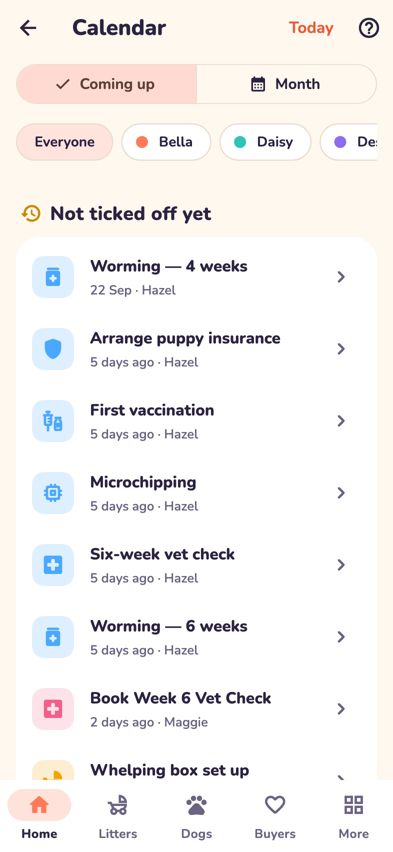
The calendar's Coming up view with puppy care dates

Microchips
Choose Microchip in Litter treatment and type each puppy's chip number next to its name. Breeders Aid warns you if two puppies have the same number.
Desexing
- Open a puppy and tap the card under Desexing.
- Choose an arrangement: Not yet decided, Desexed before going home, Entire — sold to breeder, or the contract desexing option.
- Add the Planned desexing date and, once it's done, the Actual desexing date. Tap Save.
- Planned desexing dates appear in the calendar. Entire — sold to breeder means no desexing reminders are created for that puppy.
Troubleshooting
- A care reminder is still showing after I gave the treatment. Record it with Record or Record a litter treatment. Once it's recorded, the reminder disappears.
- My vet does things on a different schedule. Open the date in the Calendar and tap Change date. See Understand the dates in your calendar.
- The dates are all a day or two out. Check the litter's birth date. Use Change birth date in the litter's ••• menu and the puppy care dates move to match.
- Is this veterinary advice? No. The schedule is a typical guide only. Your vet knows your dogs and your area, so follow their advice.
- Old reminders don't show any more. Reminders more than 10 days past their date are no longer shown under Care due, so you're not nagged about them.