Each breeding in Breeders Aid has a breeding journal: the season, progesterone tests, matings, scans and the expected whelping date. The Breeding now screen shows every breeding in progress as a simple timeline, with the next step highlighted. Breeders Aid uses these dates to estimate scans and the due date, and puts them in the calendar.
Steps
-
Open Breeding now. On Home, tap the Breeding now card, or tap Dogs and then Breeding now at the top.
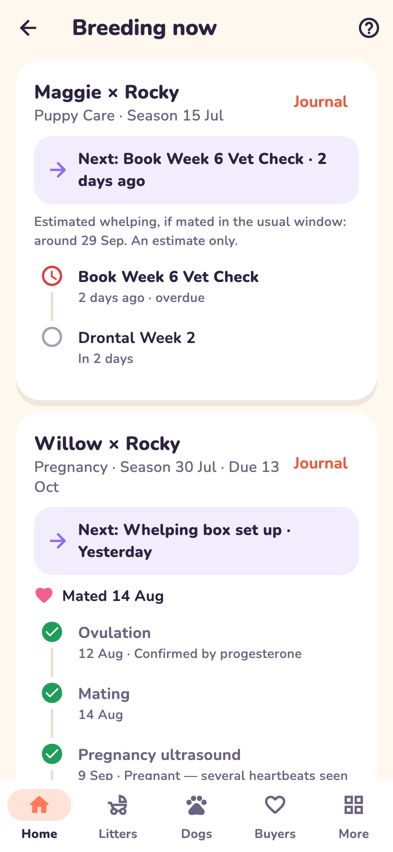
Breeding now showing each pregnancy as a timeline with the next step - Each card shows the dam and sire (for example Willow × Rocky), the stage, the season date and the due date. The purple Next: line tells you what's coming up and when.
- To tick off a simple step, tap the circle next to it. Tap it again to mark it not done.
- To record a progesterone result, tap the progesterone step. Type the Result, choose ng/mL or nmol/L, check the Tested date (tap Change if needed) and tap Save result. Once there are two or more results, a progesterone chart appears on the card.
- Matings, whelping and litter numbers are recorded in the breeding journal, so linked dates stay in step. Tap Journal on the card to open it.
- To see the pregnancy's dates laid out, open the Calendar (from Home or More). You'll see Estimated ovulation, Pregnancy ultrasound, Pregnancy X-ray and Expected whelping, plus estimated puppy care dates.

What the app estimates
- Estimated ovulation: about day 13 of the season, until a progesterone-confirmed ovulation date is entered.
- Pregnancy ultrasound: about 28 days after ovulation.
- Pregnancy X-ray: about 55 days after ovulation.
- Expected whelping: about 62 days after ovulation. If only the season date is known, it's shown as around day 76 of the season and marked Estimated.
These are general estimates to help you plan. Your vet's advice always comes first.
Tips
- A dog's profile also shows her Breeding section with the same timeline. Open her from the Dogs tab.
- When the puppies arrive, start the litter from New litter and link it to this pregnancy. See Start a new litter.
- Progesterone hints such as "Rising" or "Often the ovulation range" are rules of thumb only. Labs and dogs vary.
Troubleshooting
- Breeding now says "No breedings in progress". A breeding is started from a girl's full record when her season begins. Open her in Dogs, tap Full record: photos, files, DNA & edit and plan the breeding there.
- Tapping a step opens the journal instead of ticking it off. Some steps (such as matings) are recorded in the journal so the linked dates stay correct.
- The due date looks wrong. Until an ovulation date is entered, the due date is a best guess from the season start. Add the ovulation date in the journal and the estimates update.
- Tapping Journal in practice mode shows a message instead. The detailed journal isn't part of practice mode. The calendar shows that pregnancy's dates.